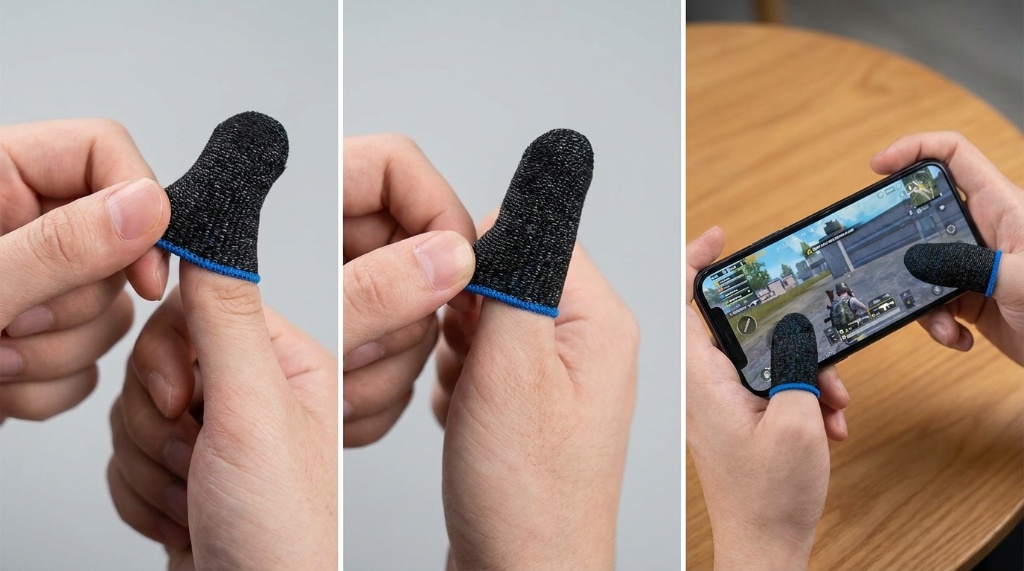
To use Risoka Finger Sleeves for Mobile Gaming, slide one sleeve onto each thumb or index finger, keep the seam away from the screen, and test touch response before you play. They reduce friction and sweat so swipes and drags feel smoother. For many players, the main benefit is comfort during long matches. If you are setting up a mobile gaming kit, Risoka Finger Sleeves for Mobile Gaming can fit into that routine. This guide explains placement, cleaning, and troubleshooting. A good setup takes only a minute, but small details matter.
Quick Answer
Put a sleeve on the finger you use for touch controls, usually one or both thumbs. Position it snugly over the fingertip with the seam facing away. Then test taps, swipes, and long presses in a practice mode. If touch feels weak, adjust the fit or try a different finger. Replace or wash sleeves when they feel slick or soaked.
Key Takeaways
- Wear sleeves on thumbs or index fingers based on your grip.
- A snug fit matters more than a tight fit.
- Test touch response before ranked matches.
- Clean sleeves regularly to remove sweat and oil.
- Finger sleeves help friction, not ping or game skill.
What Finger Sleeves Actually Do for Touchscreen Play
Finger sleeves sit between your skin and the screen. They reduce friction from sweat and oil. That can make swipes feel more consistent. However, they do not lower network latency. They also do not improve your aim by themselves.
Capacitive screens need a conductive touch. Many gaming sleeves use thin conductive fibers. If a sleeve is too thick, your taps may not register. Therefore, always test your specific sleeve on your phone.
The benefit is most noticeable in games with heavy dragging. Examples include shooters, MOBAs, and rhythm games. In those games, small friction changes can affect tracking. Still, the effect depends on your screen, hands, and play style.
How to Put Them On Correctly
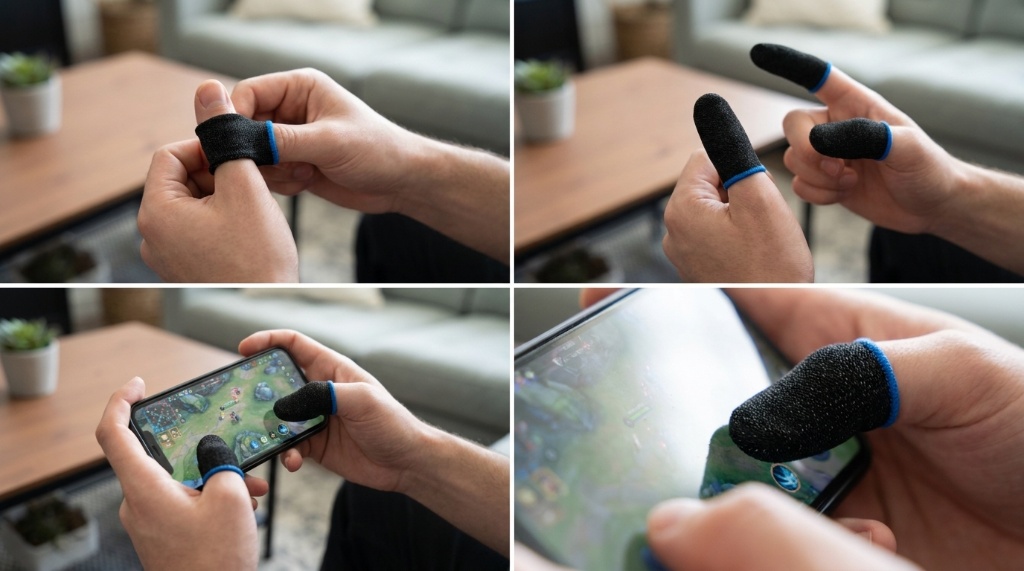
Start with clean, dry hands. Slide the sleeve onto your thumb or index finger. Roll it gently instead of pulling the fabric. Stop when the fingertip is covered and the seam sits on the side.
Step-by-Step Setup
- Wash and dry your hands.
- Choose the finger that touches the screen most.
- Slide the sleeve over the fingertip.
- Rotate the seam away from the contact point.
- Open a practice range or tutorial.
- Test taps, swipes, and long presses.
- Adjust the fit until touch feels natural.
Choosing the Right Finger
Thumb players usually wear one sleeve on each thumb. Claw grip players often use sleeves on index fingers. Some players use a single sleeve on the aiming finger. Try one sleeve first, then add more if needed.
Do not force a sleeve onto a finger that feels numb. A tight sleeve can restrict blood flow. If you feel tingling, remove it. Comfort should last through a full match.
How to Use Them During a Match
Before you queue, enter a practice mode. Test every control you use often. Check movement, aim, and camera swipes. If a button fails, fix the sleeve before the match starts.
Keep a spare sleeve nearby if you sweat heavily. Swap it when the fabric feels wet. A dry sleeve usually grips better than a soaked one. Store spares in a small pouch or case.
Avoid touching oily food or lotion before play. Oil can make the sleeve slick. It can also transfer to your screen. Wash your hands before you put sleeves on.
Cleaning and Maintenance That Protects Performance
Finger sleeves collect sweat, skin oil, and dust. That buildup can reduce grip and touch response. Clean them regularly, especially after long sessions. Always follow the manufacturer’s care instructions when available.
Most fabric sleeves can be hand washed with mild soap. Rinse them thoroughly and squeeze out excess water. Air dry them completely before use. Avoid hot dryers and fabric softener.
Rotate between two or more pairs if you play daily. This gives each pair time to dry. It also reduces wear from constant washing. Replace sleeves when the fabric stretches or the seams fray.
Common Mistakes and Troubleshooting
Touch Not Registering
If taps do not register, the sleeve may be too thick. It may also be too loose or positioned wrong. Try rotating the seam away from the screen. If that fails, test a different sleeve.
Some screen protectors reduce touch sensitivity. A thick protector can make the problem worse. Remove the protector for a quick test. Then decide which setup works best.
Sleeve Slips or Feels Tight
A slipping sleeve is often too large. A tight sleeve is often too small. Check the size guide before buying more. Some brands offer multiple sizes or adjustable styles.
If the sleeve slips during play, dry your hands. Then reseat the sleeve on your fingertip. You can also try a different finger. Do not keep adjusting it during a ranked match.
Risoka Finger Sleeves vs Bare Fingers vs Gaming Gloves
Finger sleeves are not the only option. Bare fingers offer direct touch and no fit issues. Gaming gloves cover more of the hand but can feel warmer. Each option has trade-offs for mobile play.
| Option | Best For | Trade-offs |
|---|---|---|
| Bare fingers | Simple setup and direct touch | Sweat can reduce glide, and the screen gets oily |
| Finger sleeves | Thumb or index control with less friction | Fit and touch sensitivity can vary |
| Gaming gloves | Full-hand coverage and sweat management | Warmer, bulkier, and often more expensive |
Choose sleeves if sweat and friction bother you most. Choose bare fingers if you value direct touch. Choose gloves if you want more coverage. Test one option at a time.
When Finger Sleeves Are Not the Right Fix
Finger sleeves will not fix poor network connection. They will not reduce input lag from your phone. They will not replace practice or game knowledge. If your main problem is lag, check your Wi-Fi first.
Some players prefer thumb grips or a controller. Others use a phone cooler to manage heat. Those tools solve different problems. Match the tool to your actual issue.
If you feel pain during play, stop and rest. Finger sleeves are not medical devices. They should not cause numbness or tingling. Seek professional advice if pain continues.
Frequently Asked Questions
How long does it take to get used to finger sleeves?
Most players need a few practice sessions to adjust to the changed friction.
Can I wear Risoka finger sleeves on both thumbs?
Yes, you can wear sleeves on both thumbs if your grip uses two thumb controls.
Do finger sleeves work with screen protectors?
They can work, but thick protectors may reduce touch sensitivity.
How often should I wash finger sleeves?
Wash them after every few play sessions or whenever they feel oily.
Are finger sleeves better than bare fingers?
They are better for sweat and friction, but bare fingers offer direct touch.
Conclusion
To get the most from finger sleeves, start with one clean pair. Fit them snugly, test touch in practice, and keep them dry. Clean them regularly and replace them when they wear out. If you want a smoother swipe feel, add a pair to your mobile gaming kit and test them in a practice match first.